DragonFury.online Player Guide
DragonFury.club vs DragonFury.online: Where to Log In and Play
- Published
- Last Updated
- Last Verified
Quick answer
DragonFury.online is the player website for your account, wallet, Store, Bonus, Redeem and Support. Dragon Fury gameplay is accessed through the separate game destination at dragonfury.club. Use your website login for DragonFury.online and the game credentials issued for your game account; the two passwords are not automatically the same.
If you can sign in to the website but cannot open the game, those are different access steps. This guide explains the two addresses, where to check your credentials, and what information helps support identify a login problem. It also distinguishes the browser website from game-provider app access.
What Is DragonFury.online?
DragonFury.online is the player website surrounding the Dragon Fury platform. Use it for your website account, wallet, Store, Bonus, Redeem and Support, as well as the public game catalog and guides. Private account tools require website sign-in.
The website account and the game account are not the same thing. Your DragonFury.online account signs you into this site. The Dragon Fury game login is created separately when the platform account is activated from inside the website experience.
| Task | Where to start | Credentials to check |
|---|---|---|
| Open your website account or account support | DragonFury.online | Your DragonFury.online site login |
| Open the Dragon Fury game | Your game account inside DragonFury.online; the site identifies www.dragonfury.club as the game address | The separate game login issued for that account |
| Ask about an older VBlink account | The account provider that issued it | Confirm current instructions without sending a password or verification code |
Browse DragonFury.online How DragonFury works: account, wallet and rewards Sign in to the player website
What Is DragonFury.club?
The game address identified by DragonFury.online is www.dragonfury.club. DragonFury.online provides the surrounding website account and information; the club address is the game-side destination. Opening that address does not itself create or recover an account.
If you saved a game bookmark, check its full address against the current information supplied for your account. If your account came from another provider, confirm that provider's instructions rather than assuming that a DragonFury.online website login will open it.
If a different website asks for credentials, verify why you are there before entering a password. A familiar logo or name is not enough by itself to prove that a page is the correct login destination.
Open the Dragon Fury game login Learn how game access is created and opened
Is There a Dragon Fury App?
DragonFury.online provides browser access. The public dragonfury.club game login also displays Android and iOS access badges. Those are game-provider options, not proof of a separate DragonFury.online app-store listing or a download required for every player.
A page opened in a mobile browser and an application installed from a store are different products. A similarly named app may be unrelated to this platform. If your account provider supplies app instructions, confirm the destination and supported account before installing a file or entering credentials.
- Use DragonFury.online for current account information.
- Use the game link only after you understand whether you need a website login or a game login.
- Do not install files from search results or messages that have not been verified.
Dragon Fury Login: Which Credentials Do I Use?
There are two access layers to keep separate. First, your DragonFury.online login opens the website account. Second, a game login can be created for the Dragon Fury platform after your account is eligible to open the game.
Do not assume an old VBlink login, a DragonFury.online password, and a Dragon Fury game password are interchangeable. A specific login issue should be confirmed through the current platform or your account provider.
The public platform upgrade notice on Check My Casino identifies VBlink as transitioning to Dragon Fury and directs users to their agent for updated login information. It does not confirm compatibility for your particular old login. Keep the migration question separate from recovering an existing DragonFury.online website account.
DragonFury.online login VBlink changed to Dragon Fury update Public platform upgrade and account-contact notice
What to Check When Dragon Fury Login Is Not Working
First identify where the error appears: before the DragonFury.online website opens, after website sign-in, or inside the game. A login failure alone does not prove that a platform changed, an account was deleted or a balance was lost.
For website password recovery, start from the sign-in controls on DragonFury.online. For a separate game credential issue, check the game account information associated with your website account or ask the provider that issued it. Changing a website password should not be assumed to change a separate game password.
If the website signs you in successfully but the game cannot open, record the displayed account status and exact error. Access may depend on the account's current requirements or availability, but this article does not diagnose an individual account. Do not create extra accounts or make another purchase as a way to test a login problem.
- Check the full website address and the login form you are using.
- Confirm whether the credentials belong to the website account or the game account.
- Record the error wording, the approximate time, your browser and whether the website or game was affected.
- If you share a screenshot with account support, hide passwords, one-time codes and unrelated personal information.
- Contact the provider responsible for that account before assuming an old VBlink login should work at a new address.
Contact DragonFury Support about account access Read account-access help
Safe Access Checklist
Before you log in, create a game account, or follow a Dragon Fury link, use this checklist.
- Start from DragonFury.online when you need account information or support.
- Confirm whether you are using the website login or the separate game login.
- Check that the destination matches the current platform information before entering credentials.
- Do not assume an old VBlink username, password, or balance automatically moved.
- Do not send passwords or one-time verification codes to anyone claiming to provide support.
- Use the Help Center if your account status or platform access is unclear.
Contact DragonFury Support Terms of service Sweepstakes rules
Evidence and limits
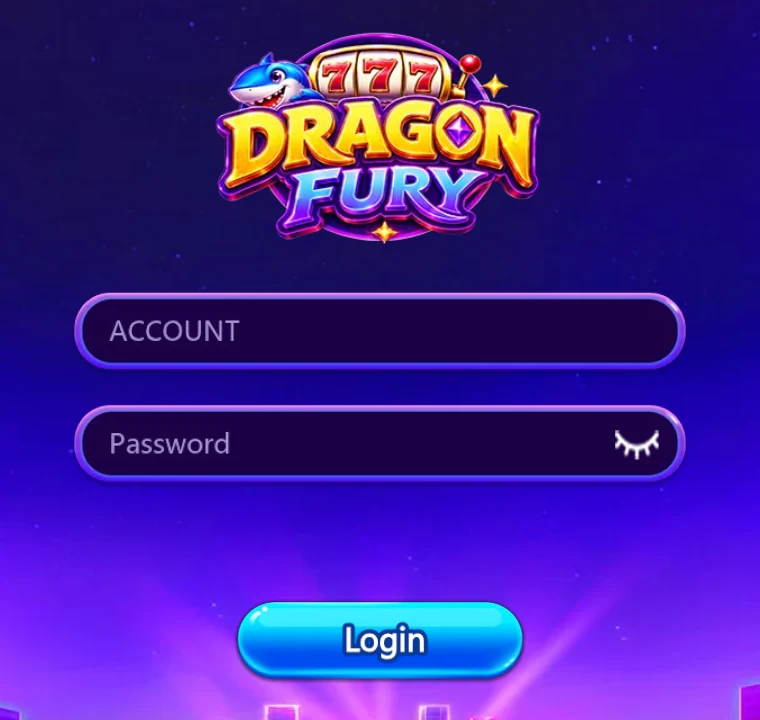
This page was reviewed against current DragonFury.online public account guidance and the public dragonfury.club login on September 18, 2026. The screenshot shows the genuine blank login and contains no credentials. The previously reviewed Check My Casino notice supports the platform-name context. The notice is linked in the login section. General troubleshooting guidance does not confirm the state of an individual account.
- CURRENT SITE INFORMATION: DragonFury.online is the account website and identifies www.dragonfury.club as the game address. Its website account and game credentials serve separate access steps.
- PUBLIC NOTICE: Check My Casino identifies the VBlink to Dragon Fury transition and tells users to contact their agent for updated login information. This is attributed guidance, not proof that a specific old account has moved.
- NOT CURRENTLY CONFIRMED: a universal standalone app, automatic old-login compatibility, automatic balance migration, or identical access for every user.
Frequently asked questions
Is DragonFury.club the same as DragonFury.online?
They serve different roles. DragonFury.online is the account website. The site identifies www.dragonfury.club as the game address for the Dragon Fury platform; website and game logins should be checked separately.
What is the current Dragon Fury website?
Use DragonFury.online for this site's account information, support and platform updates. It identifies www.dragonfury.club as the game address. Confirm the instructions for your own account before entering credentials.
Can I use Dragon Fury like an app?
DragonFury.online works in a browser. The dragonfury.club game login displays Android and iOS access options; follow the current provider instructions for your game account. This review does not certify a separate DragonFury.online app-store listing.
Should I create another account if my game login fails?
Check which login failed and contact the account provider first. Creating another website account does not establish that an existing game account or old VBlink login has been recovered.
Can I use my old VBlink login on DragonFury.club?
That is not confirmed for individual accounts. Check current credentials through DragonFury.online or your account provider before assuming old credentials work.
Where should I go if my Dragon Fury login is not working?
For a DragonFury.online account, start with its Help Center and identify whether website sign-in or game access failed. For credentials issued elsewhere, contact that account provider. Share the error and time, never your password or one-time code.