DragonFury.online Player Guide
How DragonFury Works
- Published
- Last updated
- Last reviewed
The journey is: browse → create a website account → enter the lobby → confirm a first purchase if game-account creation requires it → create or open the game account → load → play → transfer back. Use the sections below for the account, wallet, rewards or redemption step you need. The linked Games, Slots, 777 and Club guides answer catalog and access questions separately.
What Is Dragon Fury?
Dragon Fury is the primary game platform presented by DragonFury.online. The website provides account access, wallet tools, game transfers, rewards, records and support around it. A website account and a game account serve different purposes, even when both use the Dragon Fury name.
| Name | What it refers to |
|---|---|
| Dragon Fury | The game platform and its catalog. |
| DragonFury.online | This website’s player account, wallet, Store, Bonus, Redeem, guides and Support. |
| dragonfury.club | The separate Dragon Fury game destination identified by this website; use the game credentials issued for your account. |
How Dragon Fury Relates to VBlink
Check My Casino’s published platform notice identifies VBlink as changing to Dragon Fury. This site also uses VBlink Remastered to describe that relationship. The notice explains the old and new names; it does not establish an acquisition, ownership change, technical reason or automatic transfer of an individual account.
If another provider issued your old VBlink login, confirm current access with that provider. Creating a DragonFury.online account does not, by itself, recover credentials or a balance held elsewhere.
VBlink to Dragon Fury updatePublished platform transition notice
How the Dragon Fury Website Works
Before signing in, you can browse Games Included on the homepage, use its category filters and View All control, inspect the separate Try Other Games platforms, and read the guides, Help Center and rules. A catalog listing helps you identify a title; it does not confirm access for a particular account.
Sign-in is needed for private account information and actions such as saving favorites, creating game access, using the Store, moving balances or claiming an account reward. The current account screen shows which actions are available and which requirement must be completed first.
Browse the public Dragon Fury catalogDragonFury Help CenterTerms of Service
How the Dragon Fury Lobby Works
After login, the lobby brings together the primary Dragon Fury game, other configured platforms, the website balance and account tools. Store, Bonus, Redeem, Support and profile controls lead to different tasks. The game account sheet is where you inspect game access, balance information and transfer actions.
Use the status attached to the specific game. Availability can depend on account eligibility, required verification, current provider status, maintenance and applicable location restrictions. An image in the public catalog or a promotion seen by another player does not override the options shown to your account.
How Dragon Fury Games Work
The public catalog uses All Games, Slots, Fishing and Poker filters. Reviewed examples include Bonus Bears under Slots and Kirin Storm under Fishing. The filter named Poker currently groups 21 Blackjack and Keno; those titles should not be described as conventional poker rooms or variants.
Games Included and Try Other Games are different lists. Juwa, Game Vault and Fire Kirin are examples of separate platforms in Try Other Games, not individual Dragon Fury titles. Open the current game information for the title you choose to understand its own controls and rules. A listing does not guarantee permanent availability or a particular result.
Browse Dragon Fury Games
Start with the homepage catalog, choose a category and expand View All when necessary. Use the catalog guide for the named slots, fishing examples and the meaning of the displayed filters.
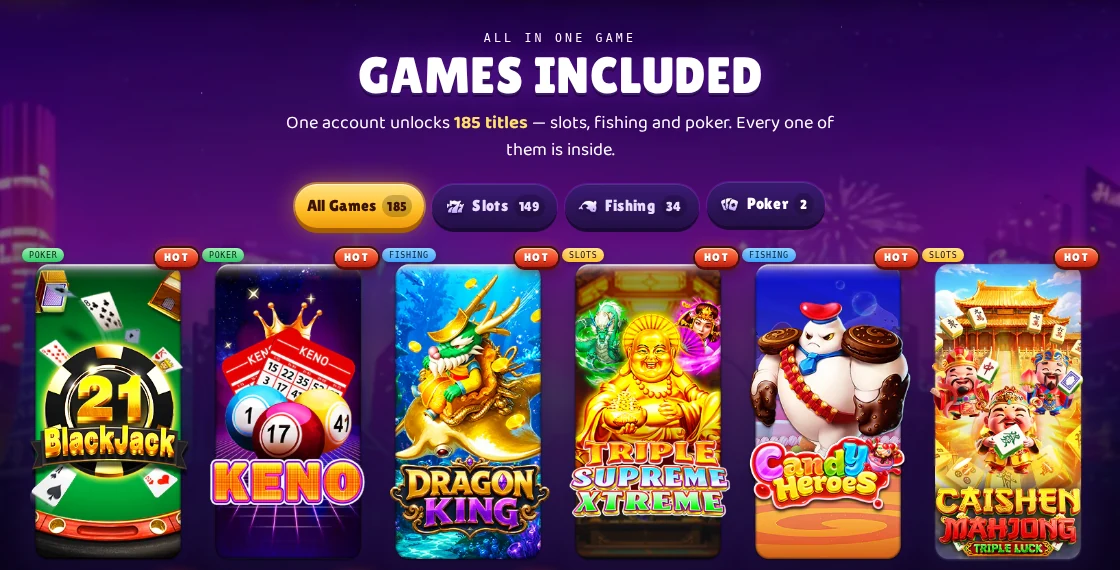
Browse Games Included on the homepageDragon Fury games and category guideDragon Fury slots: find a listed title
How a Dragon Fury Account Works
A DragonFury.online account is your website identity. It holds the private account experience and provides access to the records and tools offered here. Registration and game-account creation are separate steps.
Keep your website sign-in details private. If you forget them, use this site’s password-reset flow. Do not assume that resetting the website password also changes credentials issued for a separate game.
- Open Sign Up and complete the registration fields shown, including your name, email and password.
- Complete the email confirmation and any additional account checks requested.
- Sign in to open your personalized lobby, profile and account tools.
- Review the selected game’s access status. The current website requires a first successful confirmed purchase before creating a new game login.
- Use the account’s game and wallet controls when their requirements are satisfied; use Support for an account-specific error.
Create a DragonFury.online accountSign in to your existing website accountDragon Fury Club and website login guide
How Game Access Works
From the lobby, choose the game and use its account action. A game without an account may show Activate or Create Account; an existing game account can show its current access details. Creating a game login through the site establishes game access associated with your website account, rather than making the website password a universal game password.
For Dragon Fury, the website identifies dragonfury.club as the game destination. Follow the game access shown in your account. Other platforms have their own destinations and credentials. Account creation, opening the game and loading its balance are distinct actions: opening a game does not itself move SC into it.
If creation or access is unavailable, read the displayed requirement or error before retrying. Confirm the game name and the account involved when contacting support.
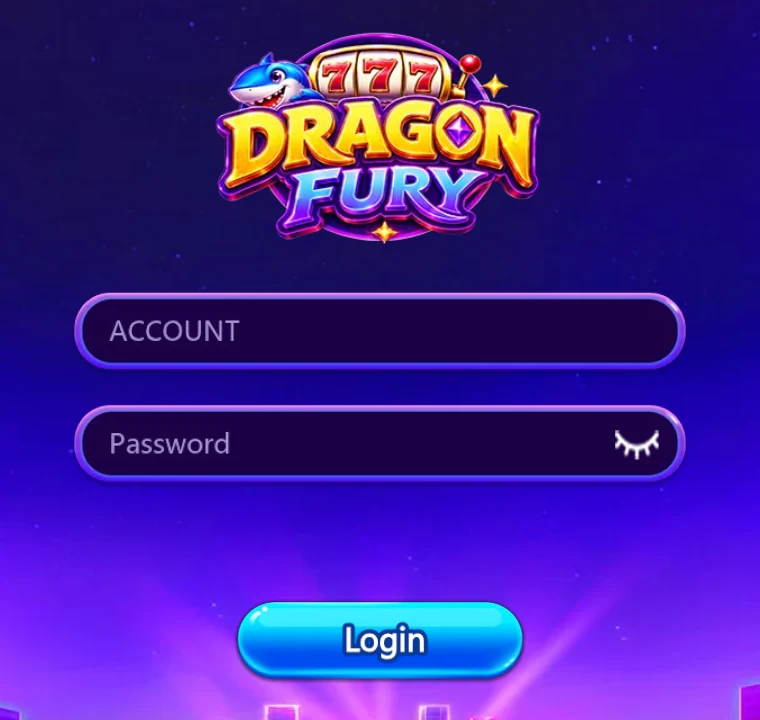
Dragon Fury Club and website login guideContact DragonFury Support about game access
How the Dragon Fury Wallet Works
Your DragonFury.online wallet and the balance inside a game are separate. The wallet shows SC managed by this website; the game account shows the balance available in that game. A completed purchase can appear in the website wallet while the game balance remains unchanged until a transfer is completed.
Check both balances and the transaction status when something seems missing. SC in a game, SC in the wallet and the amount currently eligible for redemption are not interchangeable figures.
| Action | Direction | Where to check |
|---|---|---|
| Confirmed Store purchase | Credits the website wallet | Wallet and transaction records |
| Transfer to Game | Website wallet → selected game | Transfer result and game balance |
| Transfer Back | Eligible game balance → website wallet | Live balance check and transfer result |
| Redemption request | Separate request for review | Redeem page and request history |
Sign in to review wallet transactionsSee how Store purchases reach the walletUnderstand wallet redemption
 How Loading Works
First distinguish buying an SC package from loading a game. Store purchases use the package and price shown after sign-in. The current website lists Apple Pay, Google Pay and Cash App through hosted CSPay checkout; the checkout shown to your account determines which option can actually be used.
Returning from checkout is not the same as a confirmed purchase. If an attempt is pending or its result is unclear, check the existing record and ask support before creating another payment attempt. Package prices, methods and promotions can change.
- Open Store and review the current package, price and any offer conditions.
- Complete any verification requested and continue to the displayed hosted checkout.
- After checkout, check for a confirmed purchase in the website wallet and transaction records.
- Open the chosen game account and use its transfer action when you want to move eligible SC into that game.
Sign in, then open StoreCheck the wallet and game-balance distinctionReview Bonus and offer eligibilityContact Support about an existing purchase
How Transfer to Game Works
The game account’s TRANSFER control starts the wallet-to-game flow. Select the intended game, check your available website balance, enter the amount and review the confirmation. The current load form accepts whole-SC amounts from 10 to 500 SC, subject to sufficient balance and the game’s current requirements.
Wait for the operation’s result and check the game balance before trying to play with the transferred amount. A website purchase, a requested transfer and a completed game load are different records. If the transfer is still processing or uncertain, avoid repeating it as though it had already failed.
The live form and applicable account rules control. A promotional load may also affect the later Transfer Back requirement; read those conditions before confirming the load.
How Transfer Back Works
Transfer Back moves eligible balance out of the game and into the DragonFury.online wallet. In the game account sheet, the control can be labeled WITHDRAW, while the confirmation says Transfer Back or Back to Wallet. This is not the separate payout request on the Redeem page.
The unlock threshold is a balance requirement, not a reward or a guaranteed result. The maximum is a limit, not a promised amount. Paid SC stays separate from noncashable Play Credit. Current matches last 7 days, with one selected bonus path. Earlier offers keep their accepted terms. If the live balance check blocks the action, resolve the displayed condition rather than relying on an older public summary.
- Finish the game activity and open the selected game’s account controls.
- Run the current balance check. It determines whether Transfer Back is available and shows the applicable minimum and maximum.
- Review the amount and any load or promotional conditions, then confirm once.
- Check the completed result and the website wallet before treating the balance as returned.
| Condition | Current standard rule |
|---|---|
| Requested Transfer Back amount | Must meet the minimum and maximum returned by the current balance check |
| Standard minimum for both game balance and requested amount | 10–14.99 SC: 50; 15–19.99: 60; 20–24.99: 70; 25–29.99: 80; 30–34.99: 90; 35–39.99: 100; 40–49.99: 3× load; 50+: 4× load |
| Maximum linked to that load | 10× the qualifying load |
| Promotional loads | Platform Play Credit converts verified session profit up to its accepted cap; Slots Play Credit requires 5× the original bonus in confirmed bonus-funded stakes |
How Redeem differs from Transfer BackCurrent Sweepstakes RulesDragonFury Help Center
 How Dragon Fury Rewards Work
The Bonus page shows Dragon XP progression, your current tier and Bonus Points. XP progress, Bonus Points and SC balances have different roles. Review the current tier information, point balance and available claim or redemption action in the account before expecting a reward.
The current Bonus Points conversion uses 100 points per 1 SC, in whole-SC amounts, with remaining points carried forward. Converting points credits SC inside the account; it is not a payout. Earning rates and tier requirements can change. Referral invitations and other offers have their own qualifying actions; an invitation or displayed promotion alone is not confirmation that a reward has been earned.
Lucky Spin offers, when shown, can be conditional on signup and a qualifying later load. Follow the terms attached to your result rather than assuming it is immediately spendable or withdrawable. The old seven-day daily reward calendar is retired; use the current Bonus page and displayed offers instead of expecting a calendar claim.
Sign in to view your Bonus pageRewards and promotion eligibility guideDragonFury bonus terms and offers
 How Redemption Works
Start from Redeem after signing in. The current form supports Cash App, PayPal and Chime and shows your available withdrawal amount. Your request must fit both your redeemable wallet balance and your remaining daily withdrawal allowance. Purchased but unplayed SC is not automatically redeemable. Complete the requested verification and check your own recipient details before submitting.
Your withdrawal tier sets your daily limit, up to the system maximum of 1,000 SC per day. The Redeem panel shows your current tier, completed withdrawals, pending requests, remaining allowance and reset time. Pending requests reserve allowance. You can submit more than one request only while their combined totals fit the available allowance and wallet balance. Cancelled or declined requests release their reservation; an outstanding request still reserves allowance after a daily reset.
The current form uses a 50 SC minimum and 5 SC increments, subject to your displayed maximum. An optional tip comes out of the requested total and counts within the same daily allowance. For example, a 100 SC request with a 5 SC tip counts as 100 SC and leaves 95 SC for payout, subject to approval. The tip is reserved on submission and returned if the request is cancelled or declined. The amount you receive after the tip must also meet the form's minimum and increment rules.
Submission creates a request for operator review, not a completed payout. Transactions distinguishes In review, Sending, Paid and Refused. Transfer Back only moves eligible game balance into your wallet; it does not submit a withdrawal. Verification, eligibility and the current account limits still apply, and neither a payout nor a processing time is guaranteed.
Sign in, then check Redeem and request historyUnderstand your website wallet balanceReview the Store and wallet processContact Support about a redemption requestCurrent Sweepstakes RulesVerification and transaction-review information
Dragon Fury 777
If Dragon Fury 777 brought you here, use the dedicated guide to distinguish the platform search phrase from specific listed game titles before choosing an account or game action.
Dragon Fury Club and Website
Dragon Fury Club searches commonly concern the dragonfury.club game address. DragonFury.online is the account website described in this guide. Check the complete domain and the account for which your credentials were issued; the similar names do not mean the passwords or account records are interchangeable.
Use the dedicated access guide for the website-versus-game distinction and current browser or app context. A Club or 777 search term does not establish another verified login URL.
Verification and Eligibility
Email confirmation establishes the website account’s contact address. Phone, account, device or identity checks can be requested before particular actions or during a review. Complete the specific check shown in your account; completing one step does not necessarily satisfy every later requirement.
These checks support account security and the site’s eligibility and transaction rules. Game access, an offer and a redemption can each have different conditions. Use the current terms and the displayed account decision if a general public summary differs.
Account terms and eligibilityAccount verification and review
 Support
Use the public Help Center for general explanations, the Support control or signed-in Support tab for help, or the published address support@dragonfury.online. For an account-specific problem, identify the website and game, the action attempted, the error shown and the relevant transaction reference.
Keep passwords, one-time codes and full payment details out of messages. If a different provider created the game account or holds the records, contact that provider about those records. Website support cannot be assumed to control an account held elsewhere.
Contact DragonFury SupportDragonFury Help CenterDragonFury support optionsEmail support@dragonfury.online
Responsible Play
DragonFury.online is intended for adults aged 18 and over, subject to the applicable eligibility rules. Treat play as entertainment, set time and spending limits, take breaks and use support if you need help controlling participation.
No purchase is necessary where the applicable rules provide a free method of participation. Read those rules for the method and its conditions; that statement does not remove the separate access or promotional requirements displayed by an account.
Sources and current-account checks
Reviewed September 18, 2026 against the public homepage, game catalog, account and access guides, Help Center, rewards information, rules and account behavior documented in the site source. Public summaries can omit conditions: withdrawal availability depends on the account's tier, balance and pending requests; promotional loads can change Transfer Back requirements; and game-login creation has a first-purchase gate. The live account check and applicable rules control when a summary differs.
- Named titles describe the public catalog, not guaranteed playability for every account.
- No purchase, game transfer, redemption or authenticated gameplay was performed for this editorial review.
Frequently asked questions
How does Dragon Fury work from start to finish?
Browse the public catalog, create and verify a website account, then use the lobby for game access and wallet tools. A confirmed Store purchase credits the website wallet; Transfer to Game loads the selected game. Eligible Transfer Back returns game balance to the wallet. Rewards and redemption require their own qualifying conditions and checks.
Is Dragon Fury the same as VBlink?
The published platform notice identifies VBlink as changing to Dragon Fury. It supports the name relationship, but does not establish unchanged passwords, identical features or automatic transfer of an individual account.
Does buying SC automatically load my game?
A confirmed purchase and a game load are separate. Check the website wallet and then the selected game’s transfer controls and transaction status. A purchase appearing in the wallet does not by itself confirm a completed game load.
Why can I sign in but not create a game login?
Website registration and game-account creation are separate. The current site requires a first successful confirmed purchase before creating a new game login; the account screen can also show other access or verification requirements.
Is WITHDRAW in the game account the same as Redeem?
No. The game account’s WITHDRAW action leads to Transfer Back, which returns eligible game balance to the website wallet. Redeem creates a separate request for operator review and does not guarantee payment.
Why is Transfer Back unavailable even though the game has a balance?
The balance check also applies the relevant load-based threshold, minimum, maximum and promotional conditions. Normal paid-load thresholds depend on the accepted load tier, with a 10× return cap. New Platform Bonuses convert verified profit against their accepted cap; earlier offers keep their original requirements. Use the current check result for your account.
Are Bonus Points the same as SC?
No. Bonus Points are a separate reward balance. The current conversion uses 100 points per 1 SC in whole-SC amounts, and unconverted points remain. Check the available action and current eligibility on the Bonus page.
Why is my withdrawal maximum lower than my wallet balance?
Your request must fit both your redeemable wallet balance and your remaining daily tier allowance. Completed withdrawals and pending requests count toward the daily limit, and pending requests also reserve wallet availability. Check the Redeem panel for your current maximum and reset time.
Where should I log in: DragonFury.online or dragonfury.club?
Use DragonFury.online for this website account. The website identifies dragonfury.club as the separate game destination. Follow the access information issued for the account and destination you intend to open.
Does a redemption request guarantee a payout?
No. The amount must be eligible, required verification must be completed, and an operator reviews the request. Check request history for its current status; submission alone does not confirm approval, payment or a processing time.